DLPhelper
The check before you send
Server-side DLP catches a mistake after the mail has left the outbox. DLPhelper catches it while the mail is still yours: a review inside Outlook, at the moment of sending, naming the personal and security data it found and leaving the decision with the person who knows the mail best.
At Send
3
ways out, all the sender's: edit the mail, review the findings, or send anyway
- ClassifyDecide what the data actually is.
- Verify (this page)Verified by a human before anything happens.
- DeleteBlock, strip, relabel or remove.
Outlook add-in
In Outlook
What happens at Send
Nothing to open, nothing to remember. The add-in only speaks when it has something to say.
You write and send as always
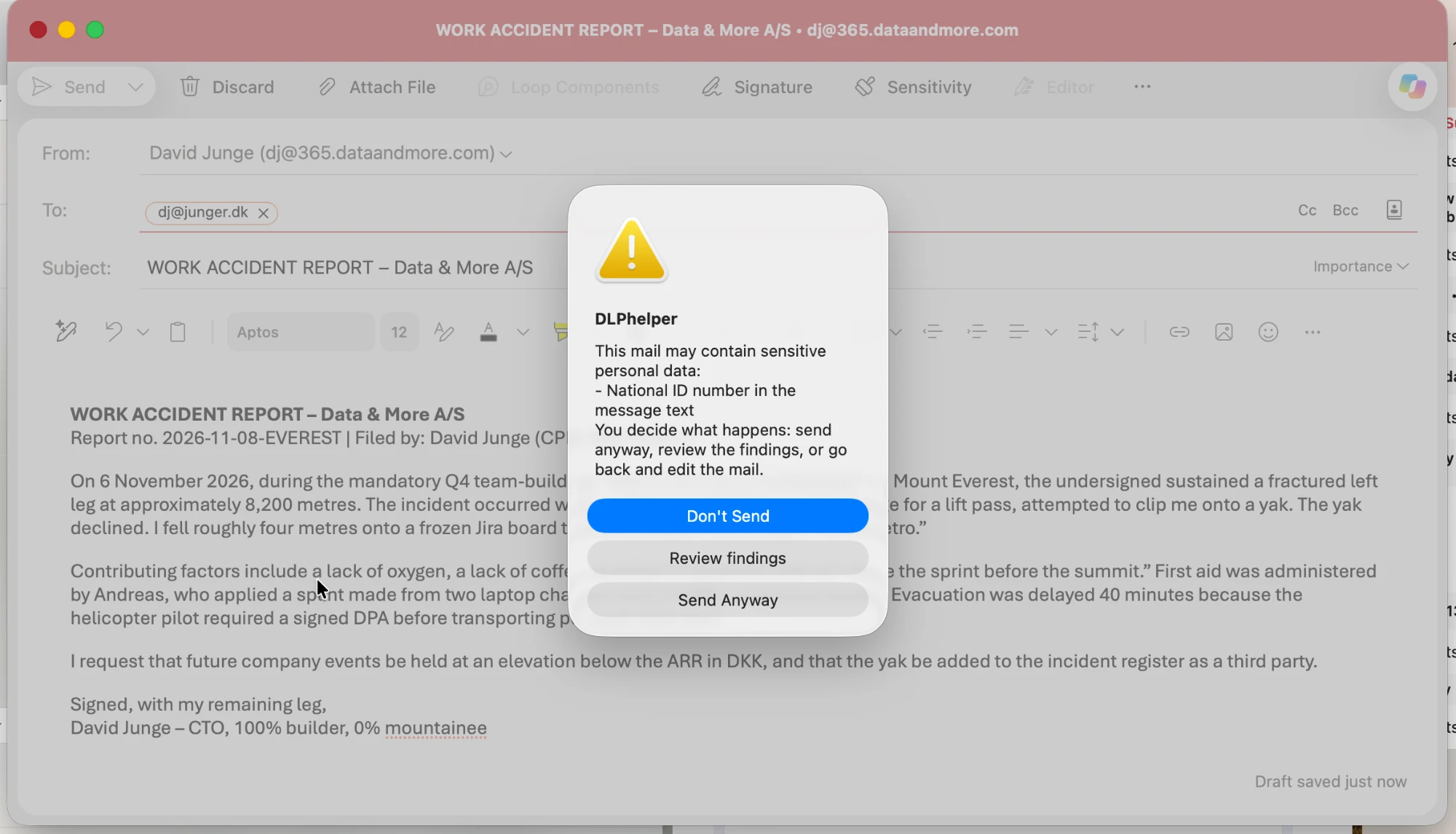
DLPhelper sits quietly in Outlook and checks the mail against the same policies your organisation runs on the server. A mail with no findings goes out as normal, with no dialog and nothing to click.
Findings are named, not hinted
When something matches, the dialog says what it is and where it sits: a national ID number in the message text, a passport in a scanned attachment. Not a vague warning that something, somewhere, might be sensitive.
You decide
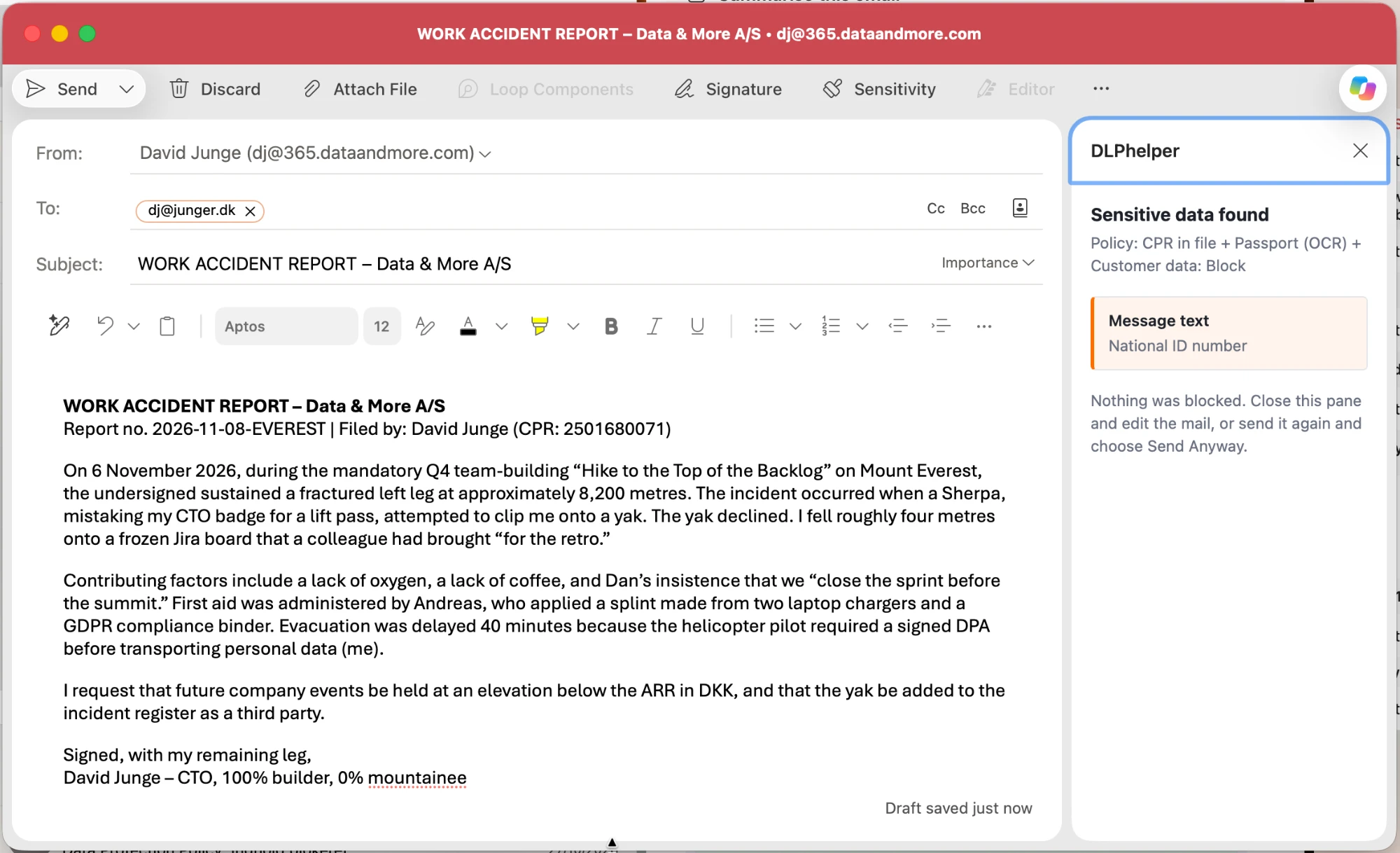
Don't Send returns you to the draft. Review findings opens a pane listing each finding and the policy behind it. Send Anyway sends the mail. Nothing is blocked silently, and nothing is decided over the sender's head.
Outlook add-in
The idea
Why the sender decides
Place
Inside Outlook
The review happens where the mistake happens: in the compose window, on the mail being written. No portal to visit, no report to read later.
Moment
Before it leaves
Enforcement after sending can hold a mail back; only a check before sending can get it edited. The CPR number comes out, and the mail still goes to the person waiting for it.
Clarity
Findings with an address
Each finding names its location: the message text or the attachment it sits in. Fixing the mail is a click back into the draft, not a search.
Trust
No silent blocks
The pane says it plainly: nothing was blocked. The sender is warned, informed and left in charge, which is why people work with it instead of around it.
Engine
The platform's classification
The same policies and document classes as the rest of the platform: CPR in a file, a passport found by OCR in a scan, customer data. One definition of sensitive, in Outlook too.
Net
The safety net stays
Server-side Context aware DLP still checks everything that leaves the organisation. DLPhelper simply means it has less to catch.
Questions about DLPhelper
Is this the same as Context aware DLP?+
They are companions. DLPhelper advises inside Outlook before the mail leaves, and the sender decides. Context aware DLP enforces across Exchange, OneDrive, SharePoint and Teams after the send, with the policy deciding. Both read the same classification.
What exactly does the sender see?+
A dialog at the moment of sending that names the sensitive data and where it sits, with three choices: Don't Send, Review findings, Send Anyway. Review findings opens a pane beside the mail listing each finding and the policy that matched.
Can the sender always send anyway?+
In the add-in, yes: DLPhelper warns, it does not block. The mail still passes the organisation's server-side DLP on its way out, so a policy set to block can still hold it. The add-in reduces how often that has to happen.
Does it check attachments?+
Yes. The policies cover the message text and the attached files, including scanned documents: a passport photographed into a PDF is found by OCR, the same way the platform finds it at rest.
How is it rolled out?+
As an Outlook add-in, deployed centrally from the Microsoft 365 admin centre. Nothing is installed on devices, and users need no training beyond a heads-up that the dialog exists.
Does it slow sending down?+
A mail with no findings is sent as normal. The dialog appears only when something matched a policy, which is exactly the mail that deserves a second look.
Put the check where the mistake happens
See DLPhelper in Outlook alongside the server-side DLP it works with.