Redaction
Share the document, not the people in it
Sometimes a document has to leave the organisation: a disclosure, a case file, an answer to a request for insight. Redaction takes the personal data out of it first, out of the file itself rather than covered with a rectangle.
Removed
100%
of occurrences, or the file is flagged before it downloads
- ClassifyDecide what the data actually is.
- VerifyLet the person who owns it confirm.
- Act (this page)Block, strip, relabel or remove.
Redaction
Workflow
From finding to finished file
The detection is automatic. The decision is not.
Get the document in
Send files straight from a report, one at a time or several at once, or upload them directly. Work is organised in projects with folders and a file tree, and anything arriving waits in an Inbox until it is moved into a project.
Review what was found
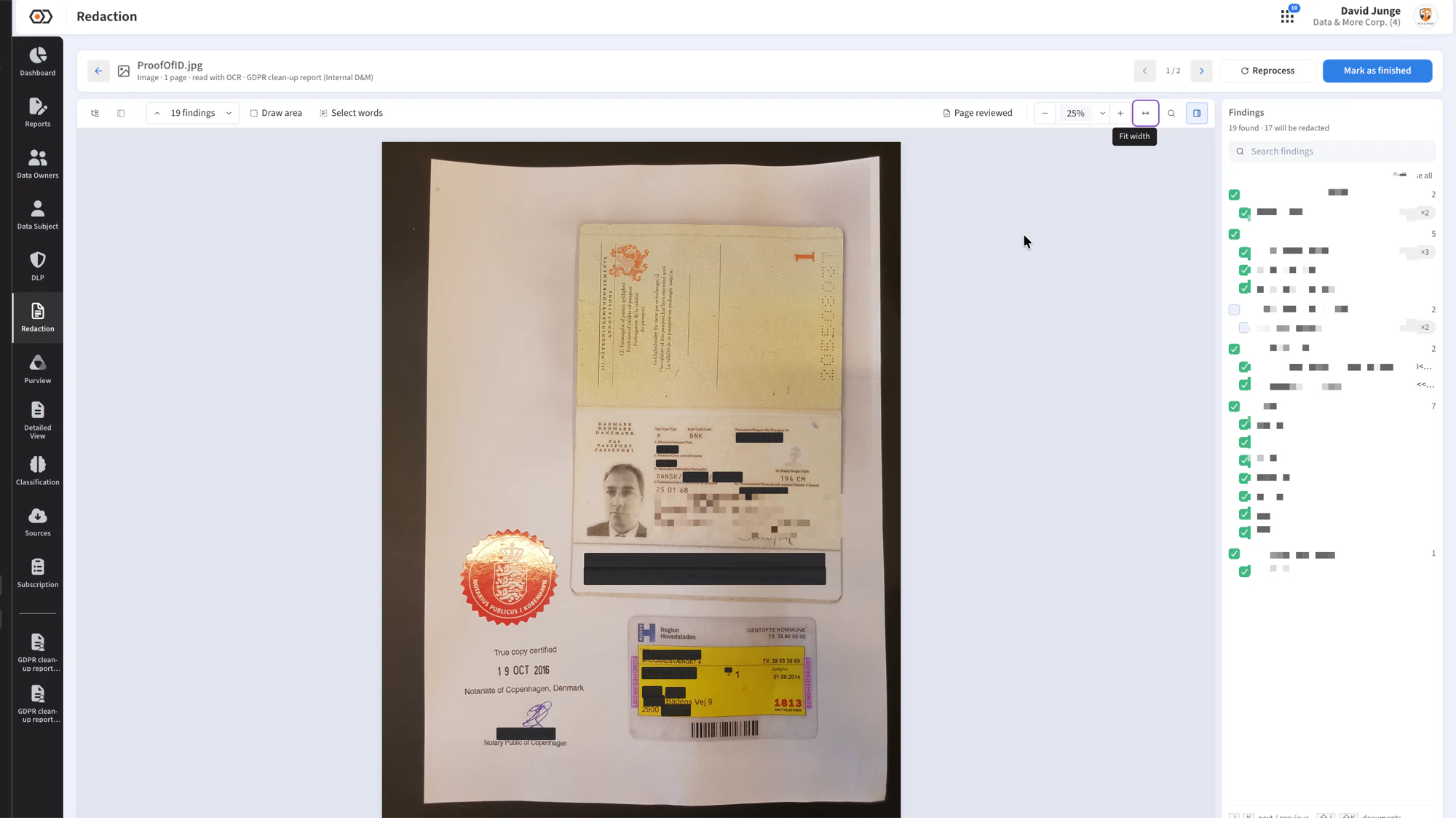
Sensitive content is detected and listed as findings. Review them one by one, redact in bulk, or keep them. Click individual words, draw an area by hand, or search the document and redact every match in one step.
Burn it in
The content is removed from the document, not drawn over. Every occurrence gets its own box, so a name appearing four times cannot leave the fourth one showing.
Check before it leaves
Anything that could not be confirmed as redacted is outlined in red and flagged Check redaction before the file can be downloaded. A box on the wrong value is worse than no box at all.
Keep the record
Finished files can be reopened, archived and restored within the retention window, or deleted permanently. Only one person edits a document at a time; everyone else sees a read-only copy with the name of the current editor.
Redaction
Awaiting capture
The redaction project tree with the inbox and project folders
public/product/redaction-projects.webp
Capability
What it handles
Formats
PDF, images, Office, email
PDF and images (PNG, JPEG, GIF, TIFF, BMP, WebP, HEIC). Office and OpenDocument files, email, HTML and plain text are converted to PDF for review and download.
Scans
Scanned pages too
A scanned page has no text layer to strip. Word boxes come from OCR and the pixels themselves are blacked out, so the visible text goes with the invisible.
Dictionary
A redaction dictionary
Search terms can be saved and applied automatically whenever a file is processed, and files already in a project can be reprocessed against them.
Access
A permission of its own
Redaction Management is granted to nobody by default, admin-lite users included. You decide who may open a document in order to redact it.
Platform
Connected to the report
A document flagged in a report goes to redaction in one click, and the policy report shows the burned-in redacted document next to the original finding.
Masking
Masked where it should be
DLP notification emails and justifications mask the values labelled for redaction, so a notification about sensitive content never repeats it.
Questions about redaction
Is the text really gone?+
What about a scanned document?+
Can we redact Outlook .msg files?+
Who decides what gets redacted?+
Is redaction the same as deletion?+
See redaction on a real document
Bring a document you would actually have to disclose and we will walk it through, start to finish.