Purview
Label the right documents with the right label
Purview labels what it can parse. Data & More classifies the rest, scores how well your labels actually protect it, and writes the correct label back into Microsoft 365.
Labelled in Purview
3.2%
of assessed documents, against the 4.5% that hold sensitive data
- ClassifyDecide what the data actually is.
- VerifyLet the person who owns it confirm.
- Act (this page)Block, strip, relabel or remove.
Purview
Purview 2.0
Scope, measure, repair
A dashboard that stops being a measurement and starts being a fix.
Scope
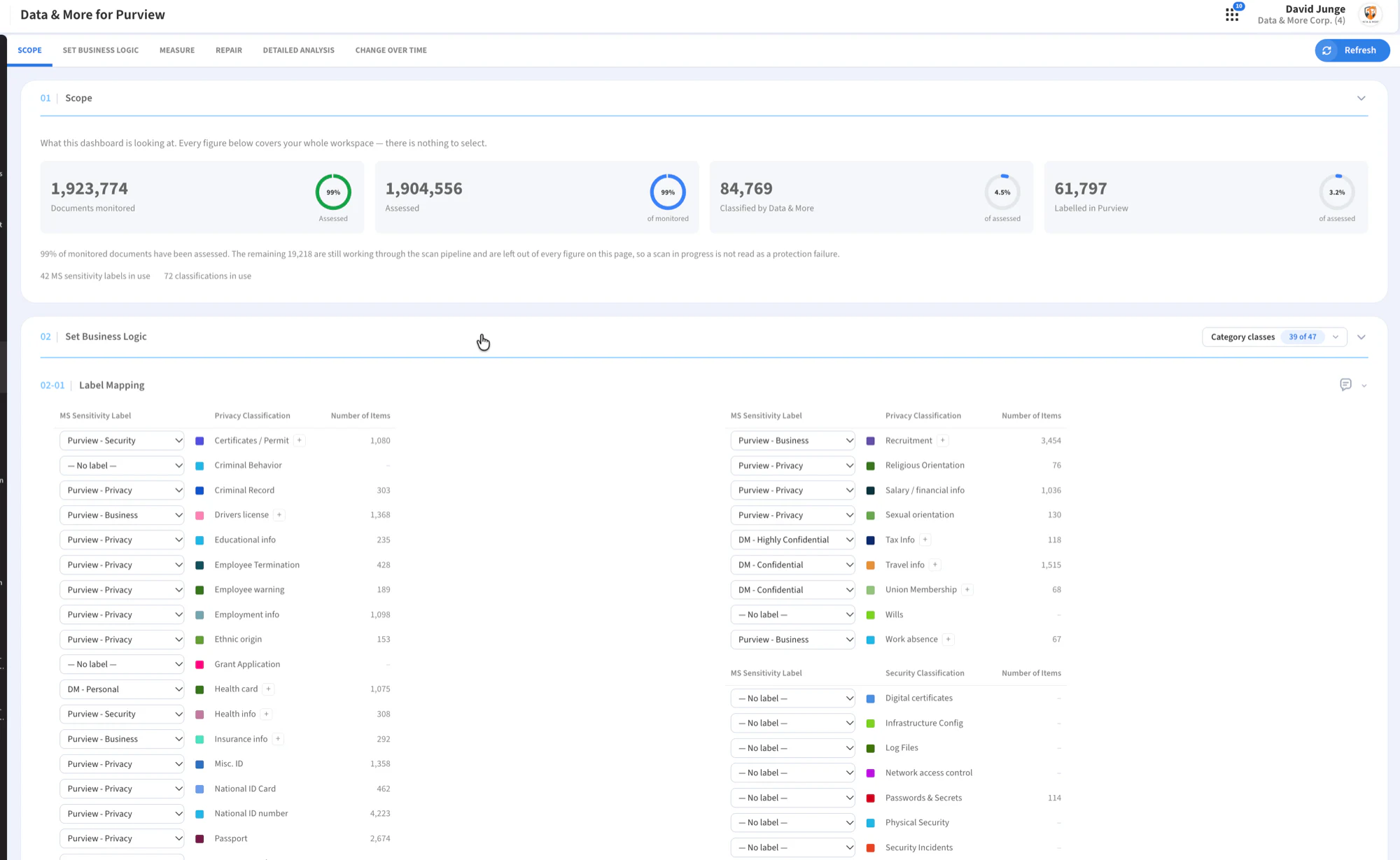
How many documents are monitored, how many have been assessed, how many Data & More has classified, and how many carry a Purview label. The gap between the last two numbers is the work.
Set business logic
Map each Data & More classification to the sensitivity label it should carry, with optional alternative labels and defaults for files and emails holding nothing sensitive. Nest labels to rank them, and mark the ones that genuinely enforce protection through encryption or rights management.
Measure
A Purview protection score next to the optimal score a labelling policy could reach, alongside a data protection analysis. One number that says how much of your protection is real.
Detailed analysis
Every assessed item lands in one bucket: correctly labelled, over-labelled, under-labelled, not labelled, not mapped, or not labellable by Purview, broken down by label and by classification.
Repair
Write the right label back. A repair rule either stamps the label into the file's metadata or asks the Purview API to apply it, can be limited to a set of data owners, and sends every fix to an append-only log.
Purview
Awaiting capture
The Purview dashboard showing the protection score against the optimal score
public/product/purview-measure.webp
Proof
Measured on 89,521 files
89,521,
files benchmarked
99.8%
of passports Purview misclassified
91%
of payment cards Purview misclassified
28
languages Data & More classifies
Purview
Awaiting capture
Detailed analysis breaking items into correctly, over and under-labelled
public/product/purview-analysis.webp
Capability
What it adds to Purview
Classification
The categories Purview does not have
Health, union membership, political views, sexual orientation, tax, salary, CVs and consents, classified in 28 languages against local regulation.
Accuracy
Semantics, not pattern matching
Purview's out-of-the-box classifiers are largely regex-based. Ours combine taxonomies, NLP, OCR and face and ID recognition, at a false positive rate of 0.003277%.
Over time
Change over time
Coverage and protection followed through a daily snapshot per workspace, so a labelling programme can be shown to be working rather than asserted to be.
Sources
More than Microsoft
The shared-data chart filters by source: email, OneDrive, SharePoint, Teams, Google Drive or Slack.
Reports
Labels in the report
MS sensitivity labels appear as a report column, next to the classification, the data owner and the location.
Writer
Two ways to write a label
Stamp the file, or go through the Purview API. Legacy Office formats, locked files and API refusals fall back to stamping, and email is always stamped.
Purview
Awaiting capture
The repair panel with the label writer and owner scope
public/product/purview-repair.webp
Questions about Purview
Does this replace Purview?+
What does Repair actually change?+
What do we need on the Microsoft side?+
Where does the benchmark come from?+
Score your own labelling
We run the measurement on your tenant and show you the gap between the labels you have and the labels the data needs.